|
HAMANN AUTOMAT-S / PostScript ?? HOW TO REMOVE THE CARRIAGE ?? ... 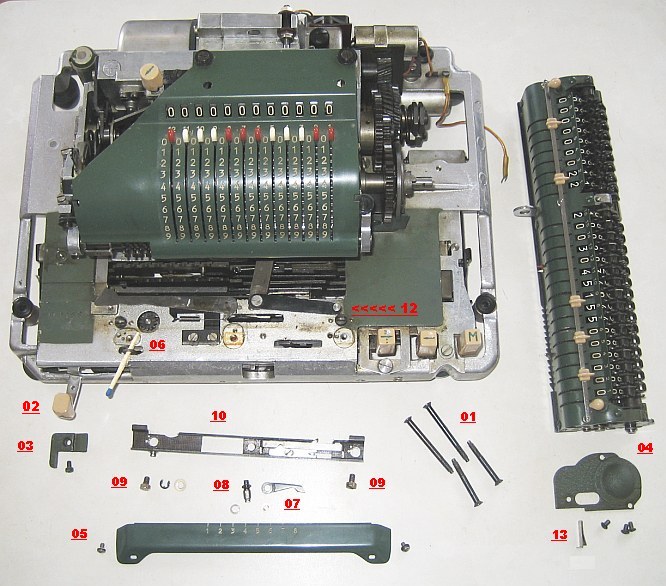 01 Remove the 4 screws from the BOTTOM-Plate (! back ones are longer !) separate COVER-Part from BOTTOM-Part and loose the GROUND-Cable 02 Set Selector to [+] and move the CARRIAGE to Position 6 or 7 If not possible, than "worst case procedure ..." 03 Remove the left STOP-Plate 04 Remove the right CARRIER-COVER ( 3 screws ) 05 Remove the FRONT COVER-Plate ( 2 screws ) over the "GIDE-TRACK" 06 Open the left CONNECTION (in picture a MATCH hold it later in place) 07 Remove in the middle the "BLACK FINGER" 08 Now you get access to its POST; unscrew the 6-edged-POST 09 Remove the 2 Cylinder-Screws right and left 10 Remove the "GIDE-TRACK" 11 Now the CARRIAGE may be pulled to front ... 12 ... there is a "Power-Connection" under the right side ... 13 PULL the "LOCK" and remove the "Power-Connection" "GOOD LUCK !!" to the rest of the restoration procedure !! Back to the HAMANN AUTOMAT-S Main Page impressum: ************************************************************************** © C.HAMANN http://public.BHT-Berlin.de/hamann 06/16/26 |